





Credential notice: Badge shown for informational credential context only. No endorsement or sponsorship is implied.
Launchpad is not “templates in a folder.” It’s a guided finishing system that eliminates the exact failure points: scope drift, policy mismatch, evidence chaos, and getting stuck at the end. You move practice-by-practice with guardrails, keep evidence notes beside the objective, and export one coherent PDF packet .
Why teams can’t “just wing it”
Rework riskWinging it usually looks like random screenshots, generic policies, and a folder full of “maybe proof.” The problem is alignment: when it’s time to affirm, teams realize their documentation does not cleanly map to what they are claiming.
- Scope first prevents overbuilding (and still feeling uncertain).
- Policy language stays tied to the practice instead of drifting into generic fluff.
- Evidence notes stay attached so you are not hunting at the finish line.
Why Launchpad wins (and why teams actually buy it)
Level 1 is not “hard,” but it is easy to do in a way that creates uncertainty at the worst time: the end. Teams buy Launchpad when they want a system that produces alignment , clarity , and a finished packet instead of document sprawl.
Finishing system, not a checklist
Guides you through scope, policies, evidence notes, and export so you actually finish the packet.
Built solely for Level 1 (FCI)
No framework sprawl. The workflow is tuned for the Level 1 self-assessment finish line.
Export you can stand behind
One coherent PDF packet that keeps your claims and your documentation connected.
When you wing it
- Scope is unclear, so you overbuild and still feel uncertain.
- Policies are generic, then you rewrite them to match reality.
- Evidence becomes scattered screenshots with no mapping.
- You reach the end and realize the packet is not coherent.
- You lose time to rework instead of moving forward.
With Launchpad
- Scope is captured once and drives the entire packet.
- Policy language stays tied to each practice.
- Evidence notes live beside the objective, not in random folders.
- Export produces a single coherent packet.
- You get next-step guidance after export.
How it works (fast, guided, export-first)
The flow is “next-step obvious” so you do not wander, overbuild, or stall. You move in order, and the app keeps everything aligned for export.
1) Scope once
Enter what matters once. Launchpad keeps the packet consistent as you move through practices and exports.
2) Work practices with guardrails
Adopt policy language, capture evidence notes, and keep your documentation attached to what you are answering.
3) Export + next steps
Export one coherent PDF packet, then follow guided steps for completing the Level 1 affirmation workflow.
The workflow (big screenshots)
Same clean experience, updated with the new screens—shown in the order teams actually complete Level 1: home → assistant → intake/scope → practices → gap closure → risk → diagram → export → attestation → submit.
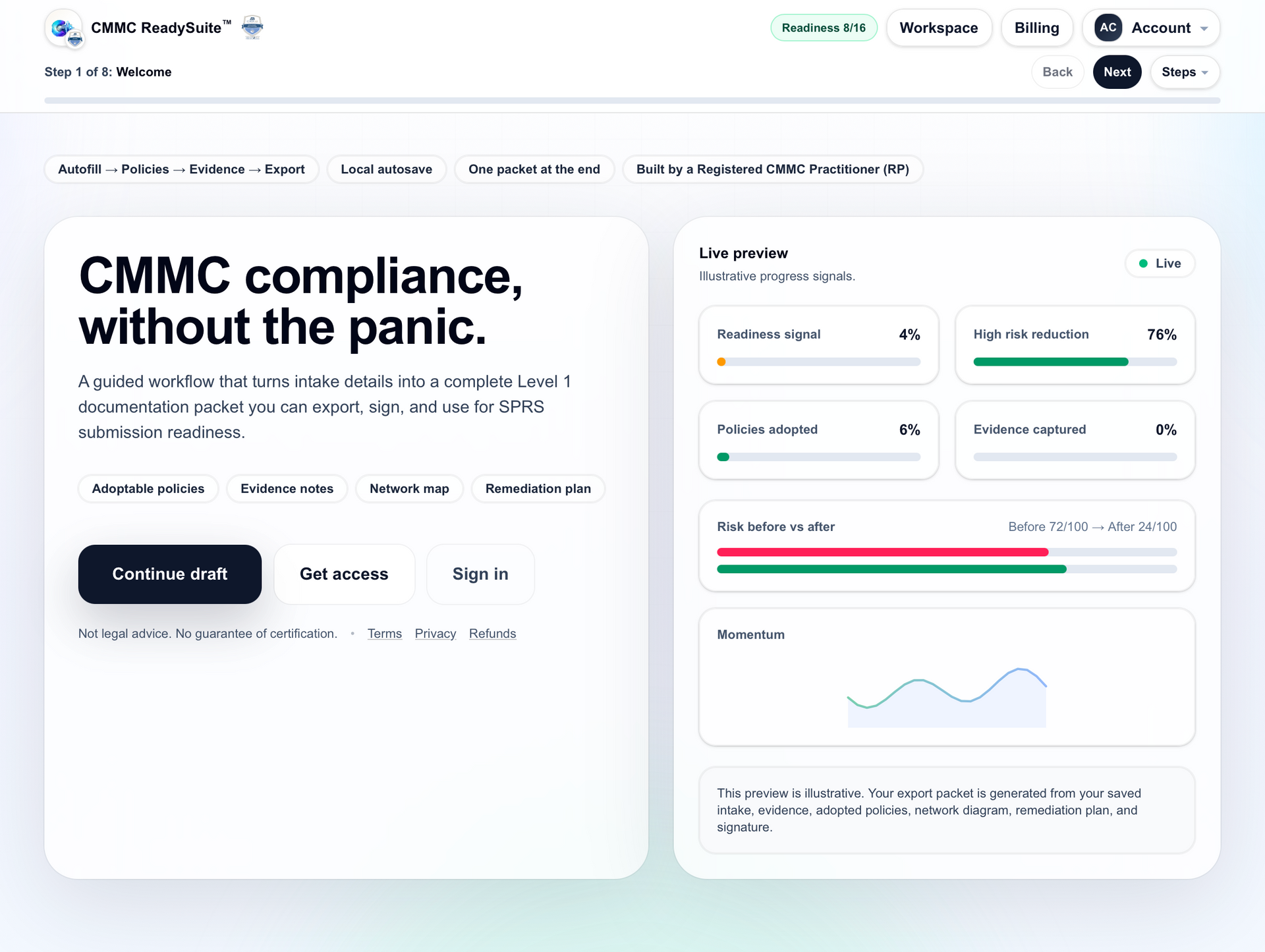
Home: your Level 1 command center
Start on a dashboard that makes Level 1 feel finishable: clear steps, visible progress, and quick access to what matters.
- See progress at a glance
- Jump back into any section
- Built around a clean export finish line
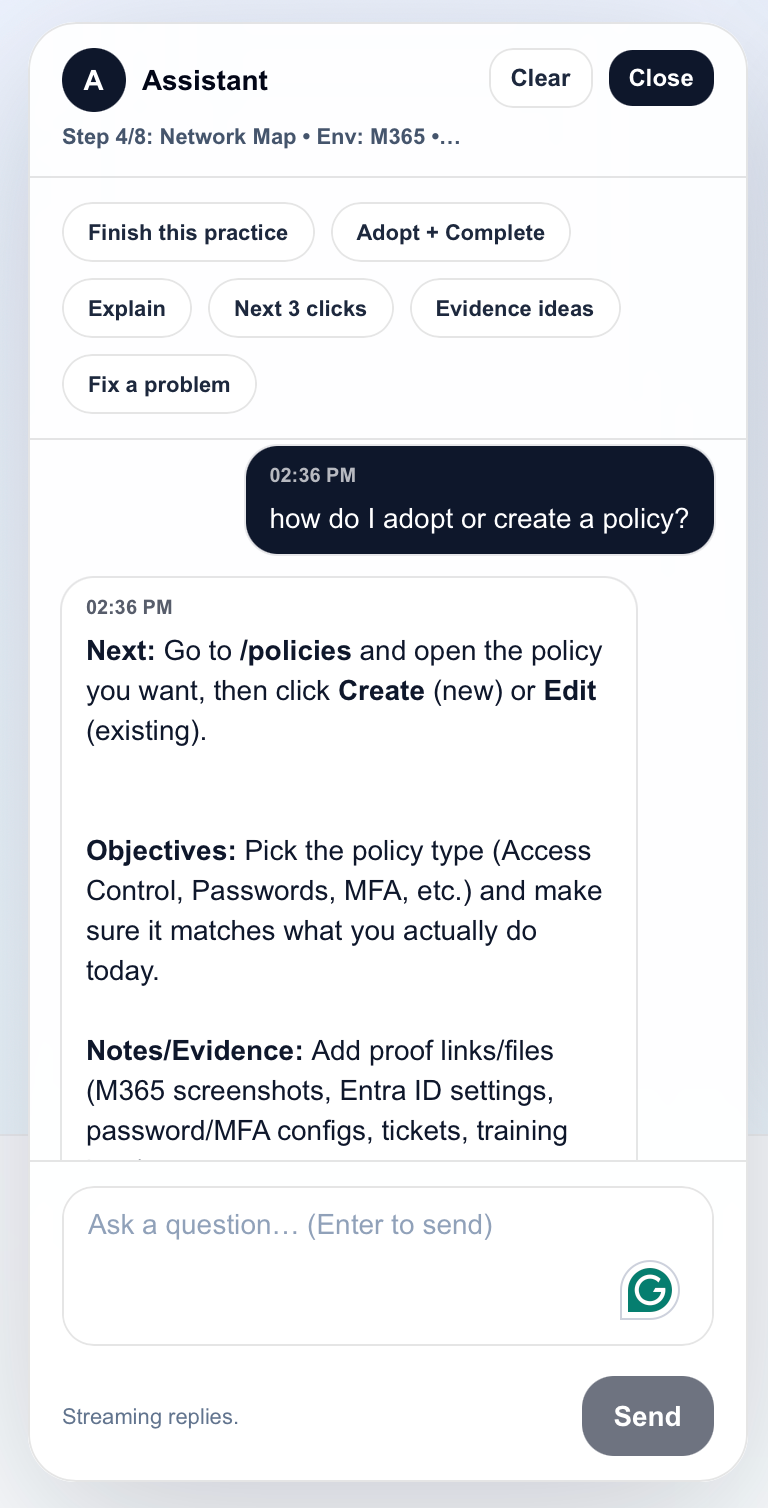
AI chat assistant: help stays inside the workflow
You don’t have to leave the app to interpret practices or decide what to document. The assistant is available while you work.
- Contextual guidance while documenting
- Reduce “guessing” and rework
- Support without breaking flow
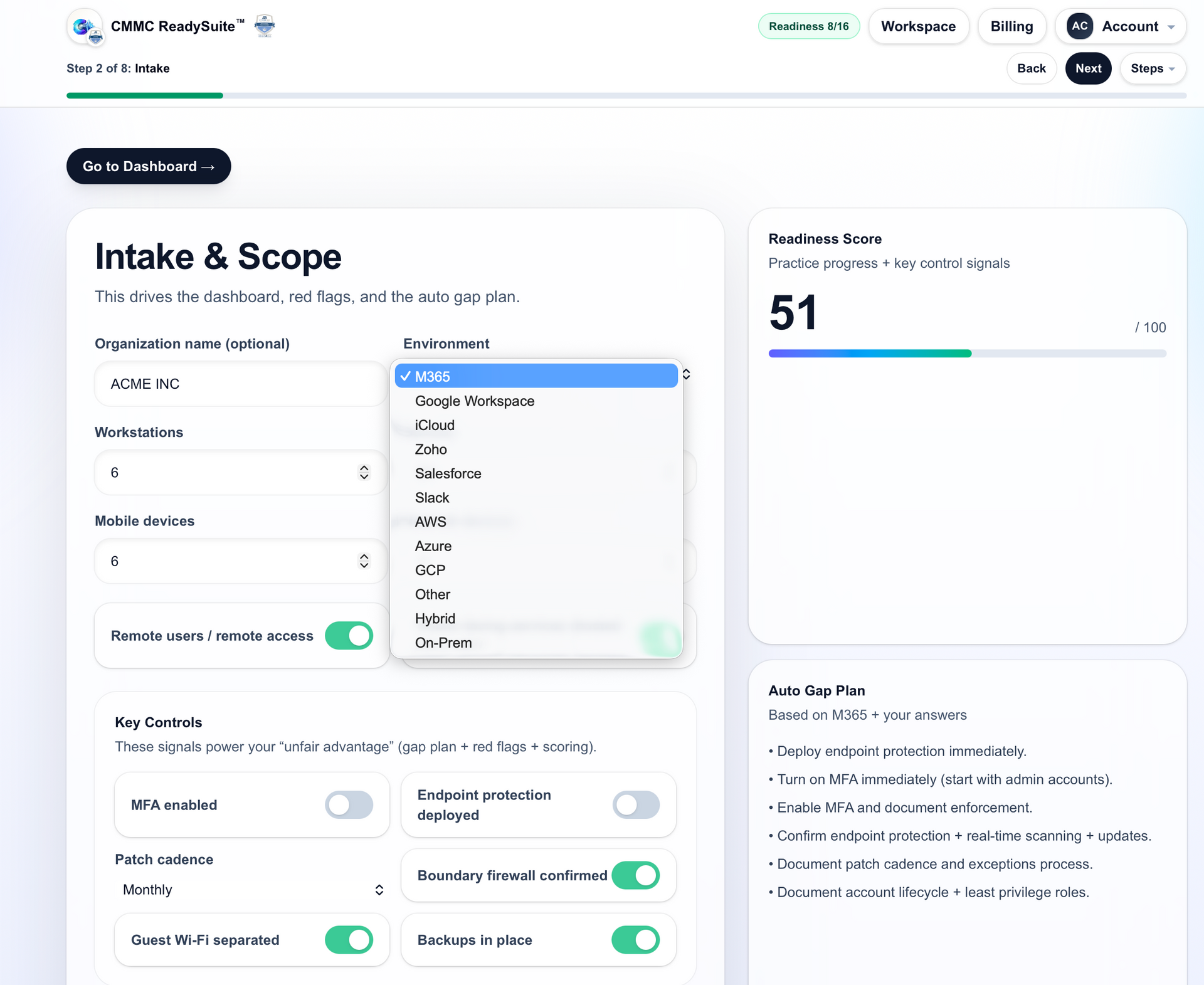
Intake & scope: align the packet from the start
Capture your scope inputs once so your practices, policies, evidence notes, and exports stay consistent.
- Scope once, reuse everywhere
- Prevents scope drift
- Feeds your export packet automatically
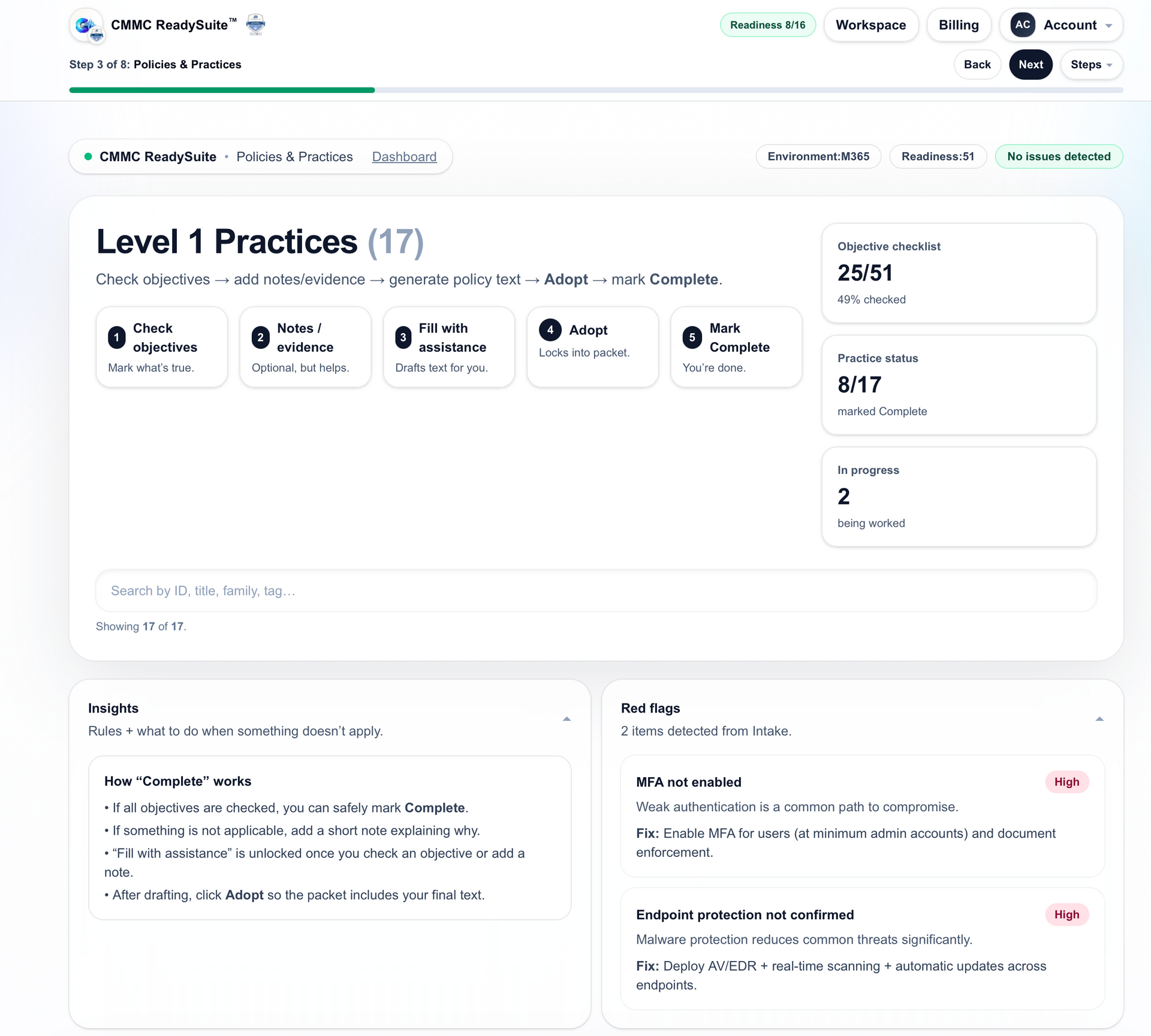
Level 1 practices: the 17 requirements in one place
Work from a clear overview of the Level 1 practice set—no “what am I missing?” anxiety.
- Level 1 only (FCI environments)
- See requirements in plain structure
- Track completion without spreadsheet chaos
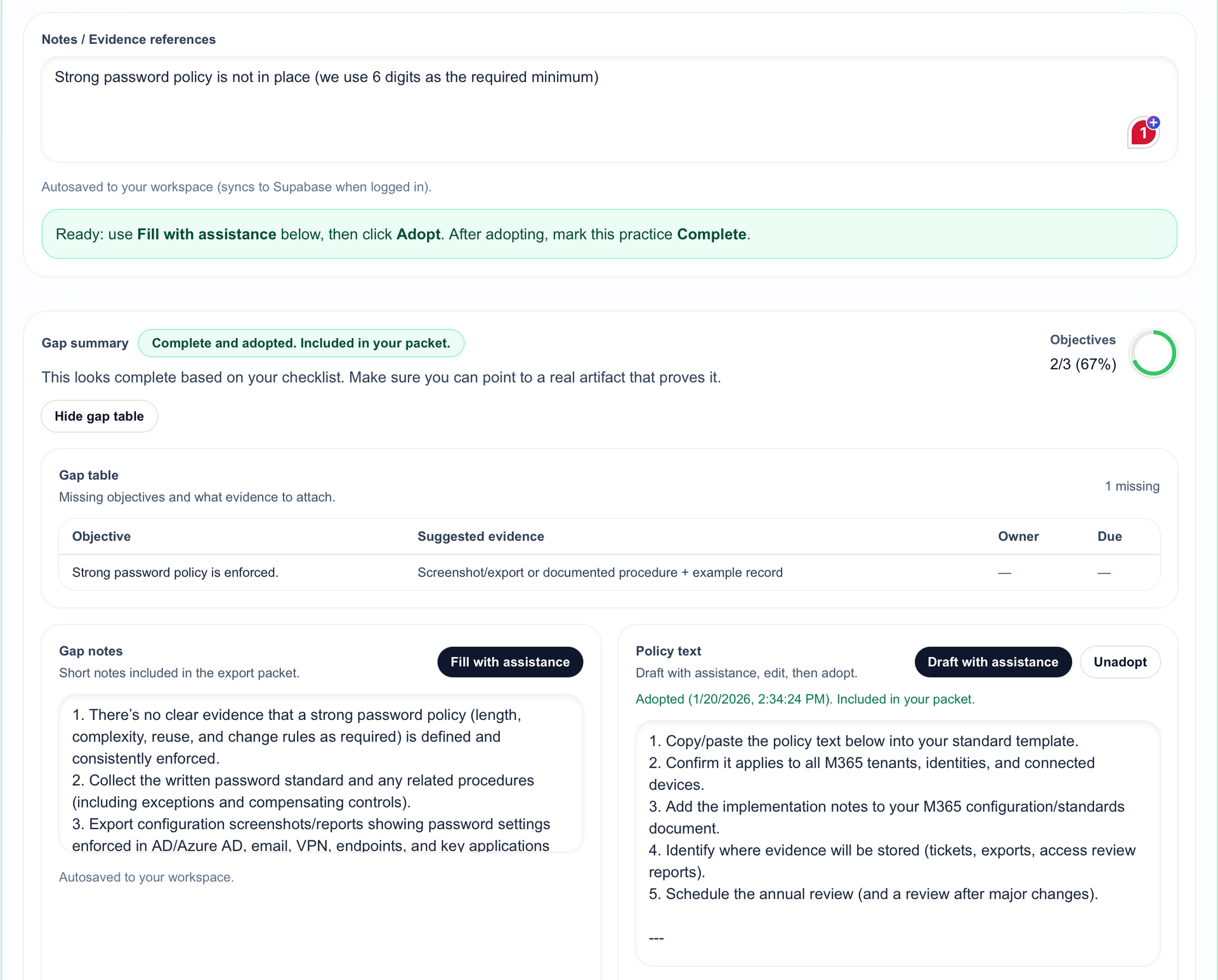
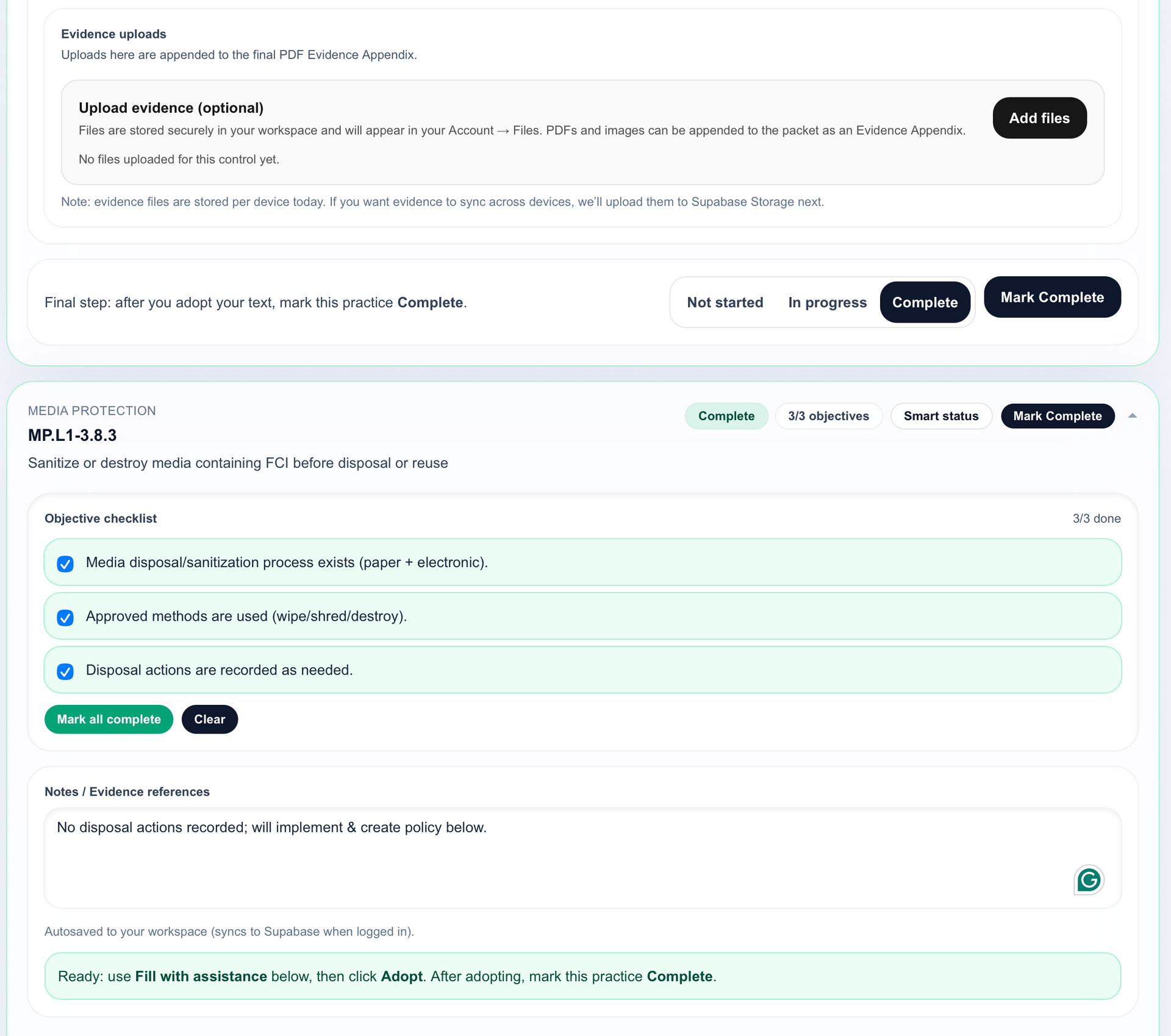
Gap analysis: checkbox-simple tracking
Mark status quickly and keep notes tied to the practice so you don’t rebuild your narrative at the end.
- Clear “what’s done vs missing” view
- Keep objective tracking consistent
- Designed for export-ready documentation
Policy creation: fill gaps and adopt cleanly
When something is missing, you don’t have to write from scratch. Generate policy language you can adopt and tailor.
- Policy language tied directly to the practice
- Adopt and tailor (not generic “template dumps”)
- Reduces rewrite cycles
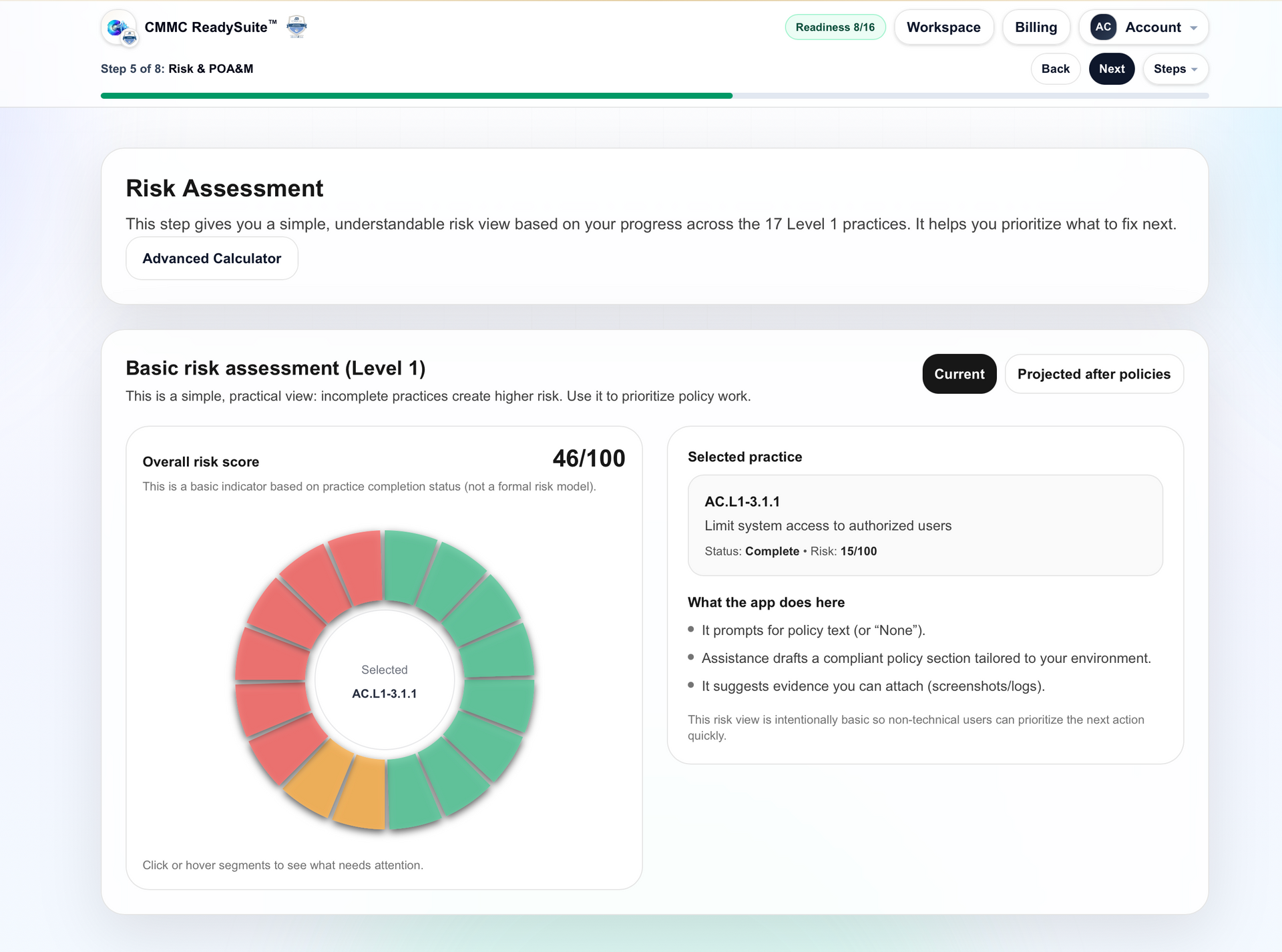
Risk assessment: capture baseline risk (before)
Document your starting point so your packet reflects reality—what’s implemented, what’s in progress, and what’s accepted.
- Baseline risk capture
- Supports clarity when affirming
- Helps avoid “we forgot to document that”
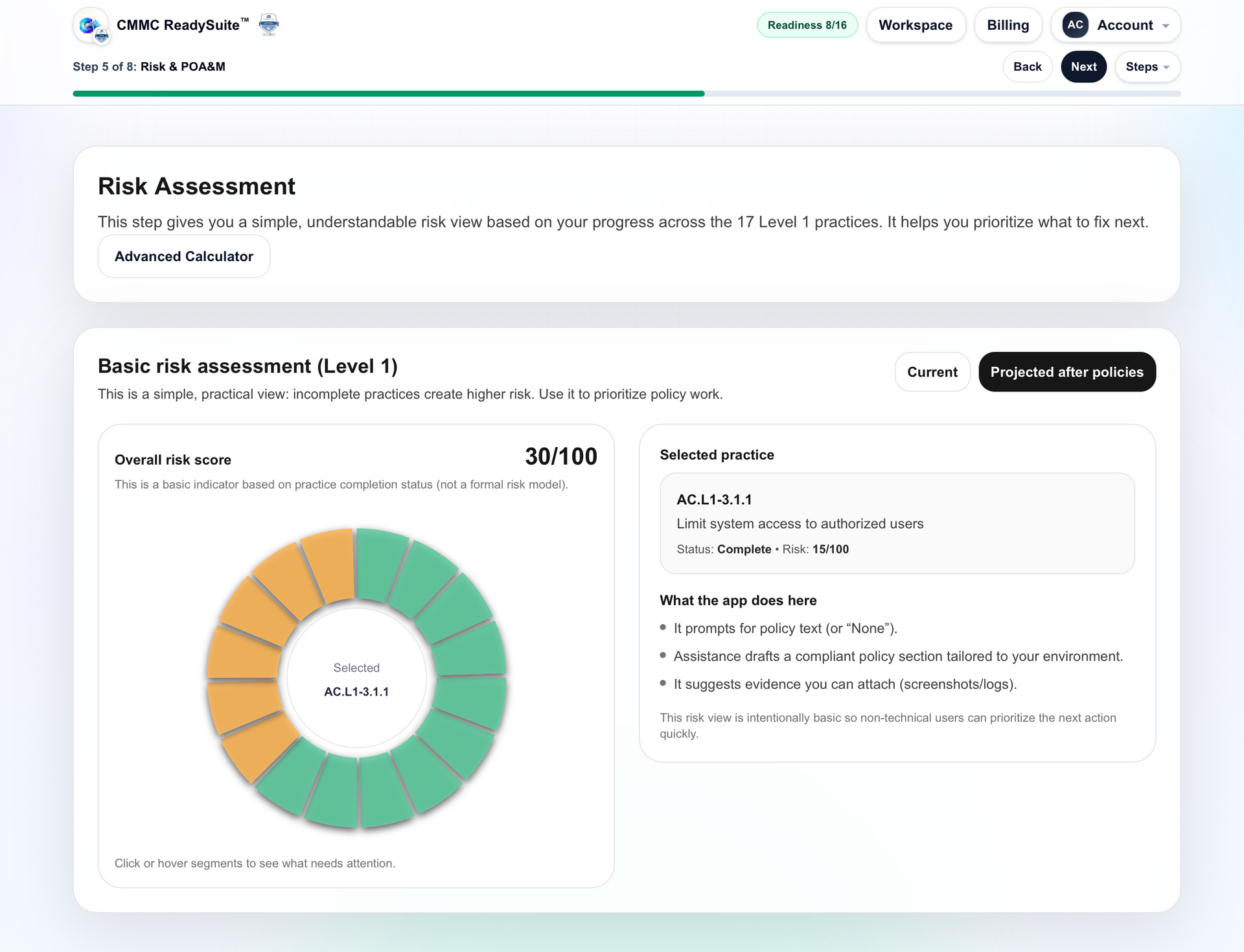
Risk assessment: updated view (after policies)
As you adopt policies and document decisions, the risk assessment reflects the updated state—so your packet stays coherent.
- Shows the “after” state in your documentation
- Keeps risk notes aligned to changes
- Export includes the updated assessment
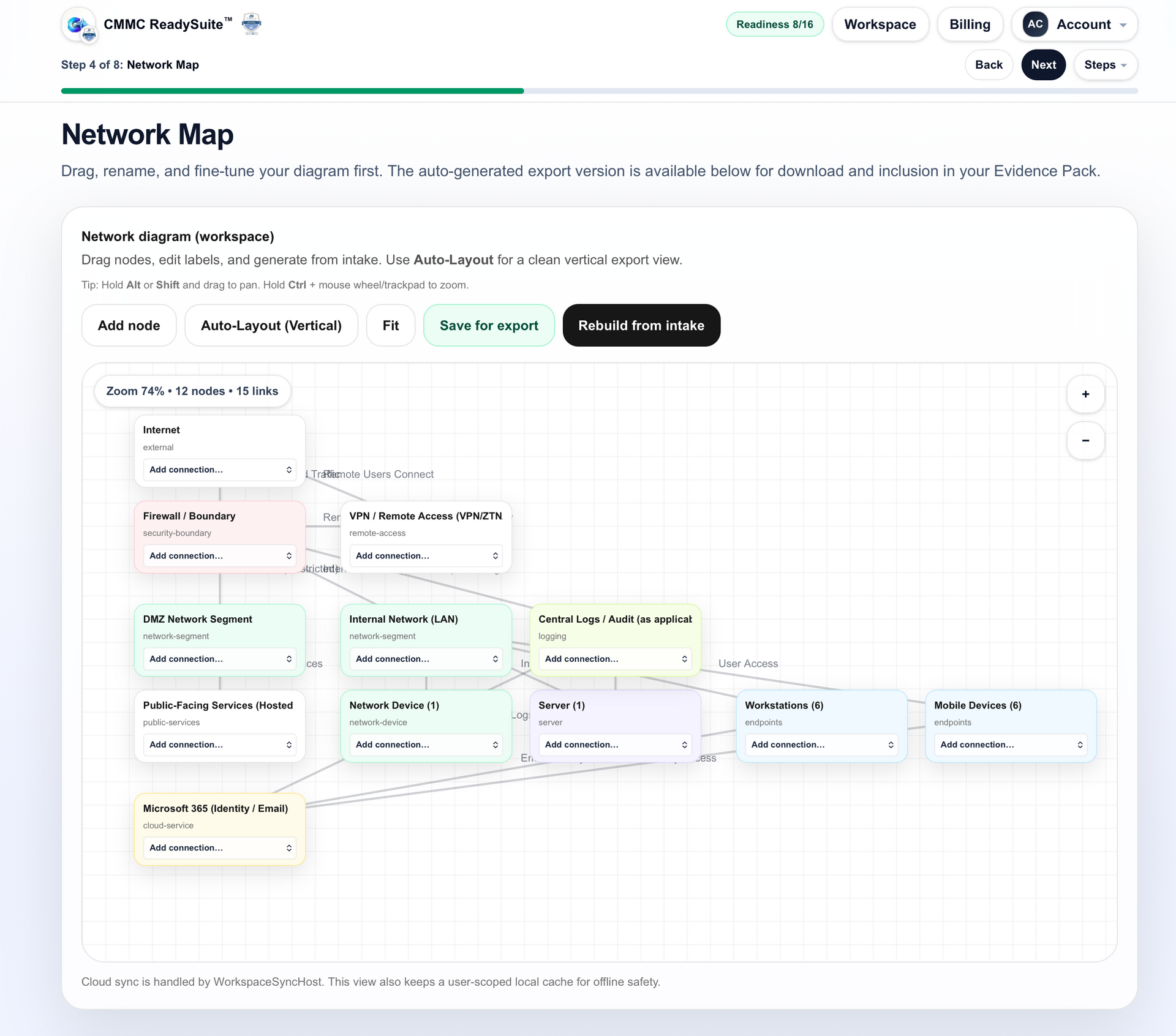
Network diagram maker: build it without the pain
Generate a usable network diagram that can be included in your export packet—without starting from a blank canvas.
- Faster than manual drawing
- Consistent artifact for the packet
- Ready to include in export
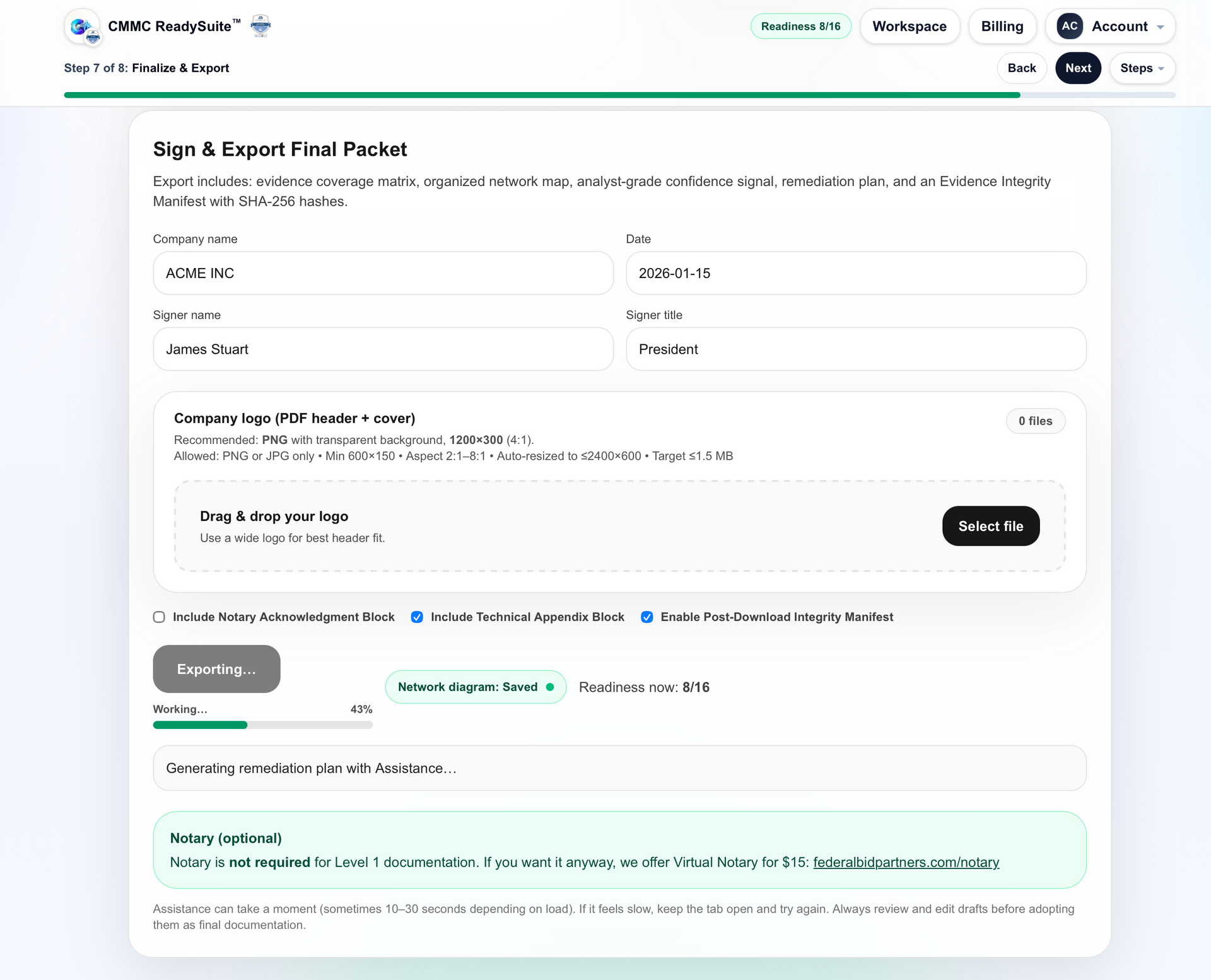
Export & sign packet: everything in one PDF
Export a single packet containing your risk assessment, adopted policies, notes, and diagram—so you aren’t assembling evidence at the end.
- One coherent PDF packet
- Aligned artifacts (not random screenshots)
- Easy to re-export after updates
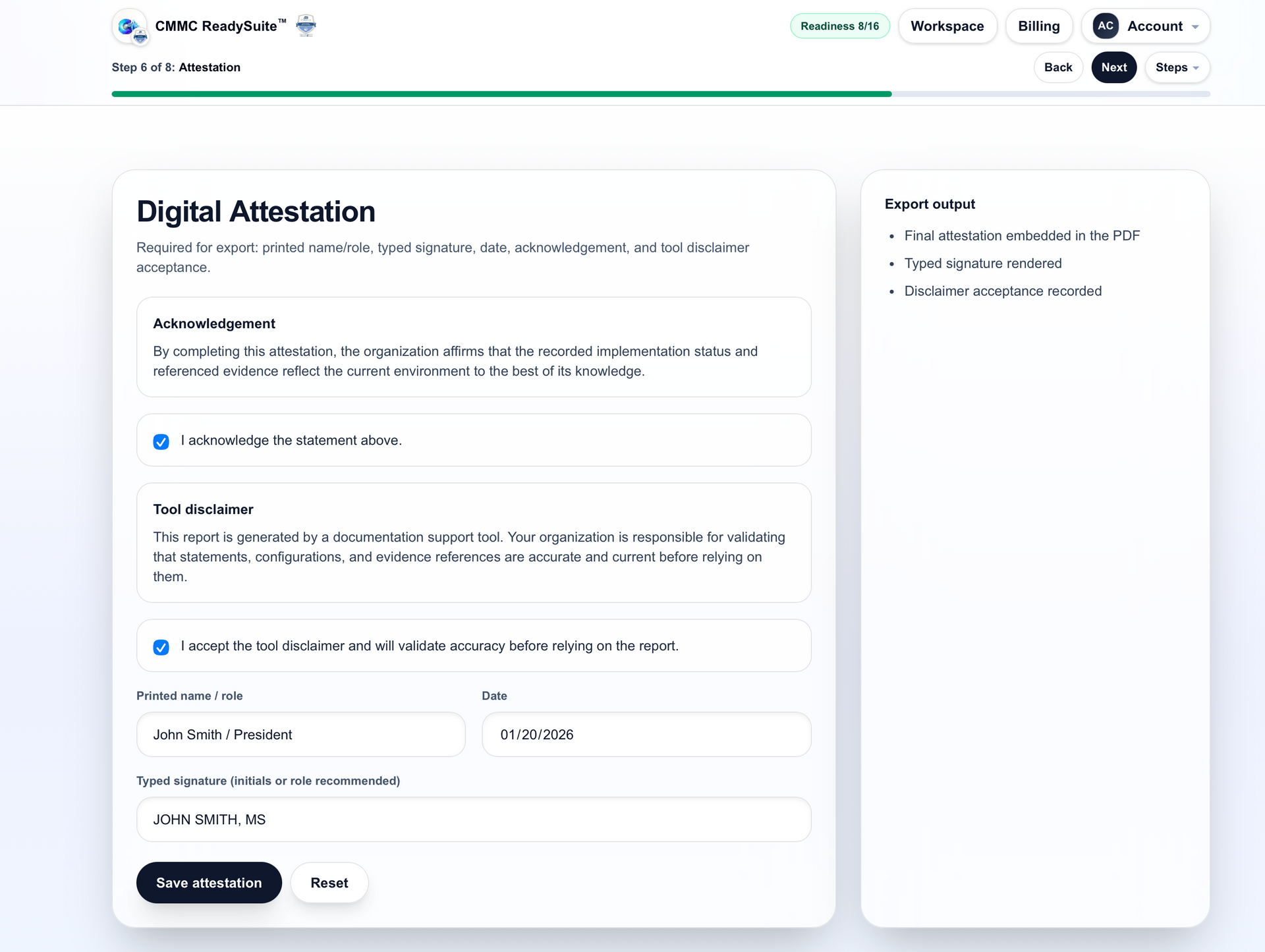
Attestation: complete the affirmation artifacts
Follow guided steps for the Level 1 attestation/affirmation artifacts in the correct sequence (you remain responsible for submission decisions).
- Structured “what’s next” guidance
- Helps prevent missed steps
- Keeps your packet and attestation aligned
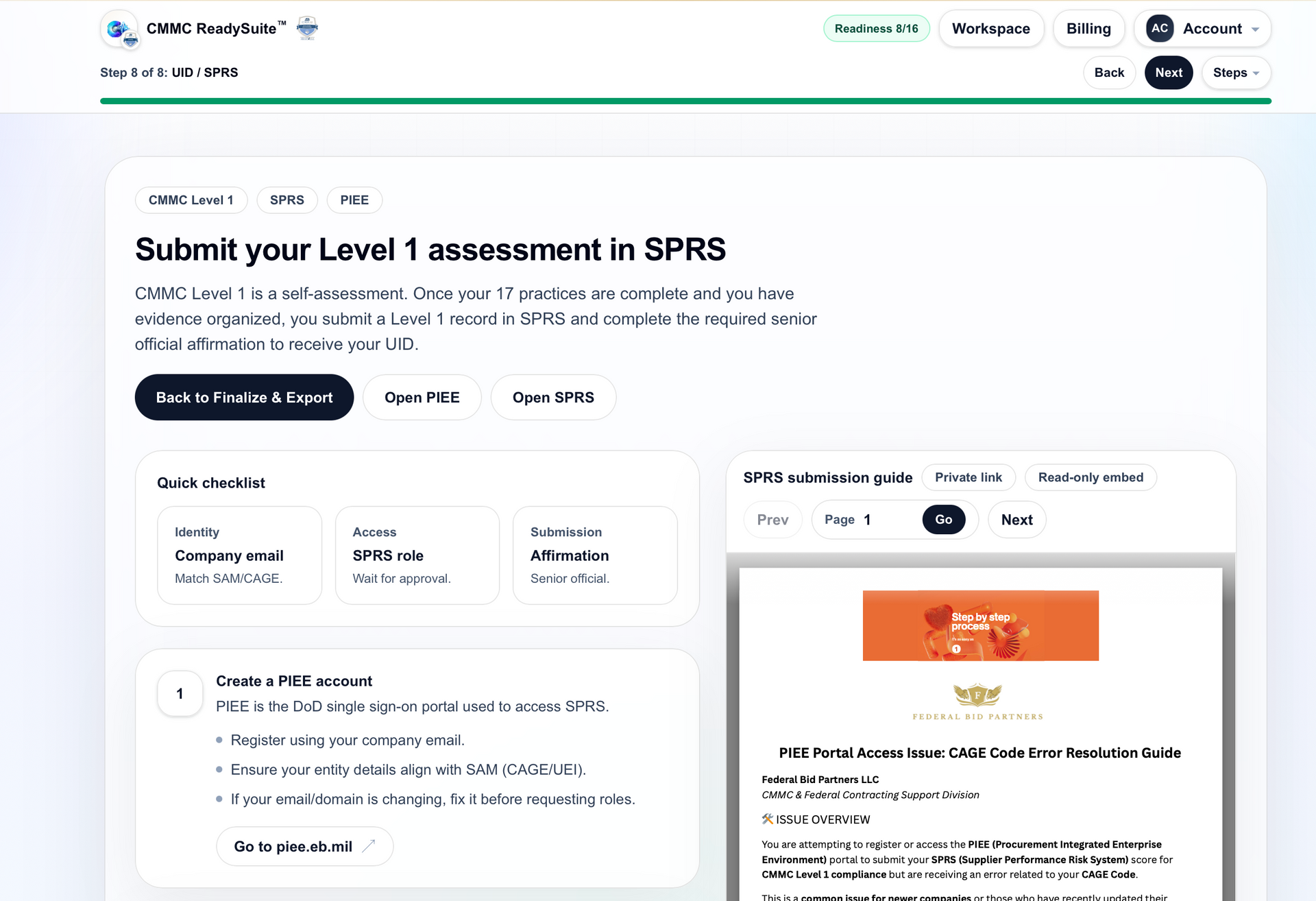
Submit Level 1: guided reporting steps
A clear, guided submission path so you know what to do after you’ve exported and reviewed your packet. No endorsement implied—this is workflow guidance.
- Clear “finish line” steps
- Less uncertainty at the end
- Designed to reduce rework
Pricing
Built for teams who want to complete Level 1 themselves—without paying thousands just to assemble documentation. Done-for-you completion is available ( ) if you want it handled end-to-end.
- Practice tracking + outcomes
- Adoptable policy drafts tied to practices
- Evidence notes aligned to objectives
- Export one coherent PDF packet
- Guided “what’s next” steps after export
- Ongoing access to your workspace
- Continued improvements and refinements
- Maintain organized records over time
- Scope drives everything: intake aligns practices, evidence notes, and export.
- Evidence stays attached: notes live beside the objective, not in random folders.
- Policies stay aligned: adoptable language tied directly to practices.
- Export doesn’t stall: one packet + clear next steps.
FAQ
Clear answers up front so buyers don’t hesitate at checkout.
Not for: Level 2 / CUI-heavy environments where you need additional requirements beyond Level 1’s scope.
Policies & Support
Summaries below. Use the buttons for the full policies.
Privacy Policy (summary)
We collect only what we need to provide the service, process payments, and support your account. We do not sell personal information.
- Account data: contact info and basic access status.
- Payment data: processed by the payment provider; we do not store full card numbers.
- Security: standard measures; avoid uploading data you aren’t authorized to store.
Terms of Use (summary)
CMMC Launchpad™ is a documentation/workflow tool. Not affiliated with or endorsed by the DoD. You are responsible for implementation, accuracy, and submission decisions.
- No guarantees: outcomes depend on your environment and implementation.
- Acceptable use: do not use for unlawful purposes or store data you aren’t authorized to store.
- Renewal: Year 1 included; renewal details are in the full Terms.
Refund Policy (summary)
Refund terms are defined in the full Terms. Because this is a digital product with immediate access, refunds may be limited except where required by law.
- Immediate access: features are available upon purchase.
- Billing clarity: includes the first 12 months; renewal details are in the Terms.
- Billing issues: contact support promptly if you believe there was an error.
Support
Need help getting started or have a billing question? Email: contact@federalbidpartners.com
- Typical help: access issues, billing questions, export troubleshooting.
- What we don’t do: we do not submit on your behalf or issue certification.
- Best results: follow the workflow in order (scope → practices → policies → evidence → export).

Launchpad is a guided finishing system. You progress practice-by-practice with built-in guardrails, keep evidence beside each objective, and generate one coherent PDF packet.
How it works (fast, guided, export-first)
Move in order, stay aligned, finish cleanly. Launchpad is designed to remove rework at the end.
1) Scope once
Set environment boundaries once so policies, evidence notes, and export remain consistent.
2) Work practices with guardrails
Adopt policy language and capture objective-linked evidence without document sprawl.
3) Export + next steps
Generate one packet and follow guided Level 1 affirmation flow.
Home + assistant keep momentum high
Dashboard and in-workflow guidance reduce uncertainty and speed decisions.
- Progress visibility at every step
- Contextual guidance while documenting
- Clear path to export
Gap closure and policy adoption
Capture what's missing and adopt policy language where it belongs.
- Practice-by-practice clarity
- Lower rewrite cycles
- Evidence linked to objective
Export and affirmation readiness
Stop assembling random artifacts at the finish line. Export one coherent packet.
- Single PDF export packet
- Aligned policy, risk, notes, and diagrams
- Guided next steps after export
Pricing
Built for teams that want to complete Level 1 internally without paying large consulting quotes for documentation assembly.
- Practice tracking + outcomes
- Policy drafts tied to practices
- Evidence notes aligned to objectives
- Export one coherent PDF packet
- Guided post-export next steps
- Ongoing access to your workspace
- Continuous refinements
- Maintain reusable records
- Scope drives everything: intake aligns practices, evidence, and export.
- Evidence stays attached: notes beside objectives, not in random folders.
- Policies stay aligned: language tied directly to practices.
- Export does not stall: one packet and clear next steps.
FAQ
Clear answers that remove friction before checkout.
Policies & Support
Summaries below. Use buttons for full policy pages.
Privacy Policy (summary)
We collect what is needed to provide service, process payments, and support access. We do not sell personal information.
- Account data: contact details and access status.
- Payment data: handled by provider; we do not store full card numbers.
- Security: standard controls; do not upload data you are not authorized to store.
Terms of Use (summary)
CMMC Launchpad™ is a documentation/workflow tool. No DoD affiliation or endorsement is implied.
- No guarantees: outcomes depend on your environment and implementation.
- Acceptable use: no unlawful activity or unauthorized data handling.
- Renewal: Year 1 included; renewal details are in full Terms.
Refund Policy (summary)
Refund terms are defined in the full Terms. Digital products with immediate access may have limited refunds except where required by law.
- Immediate access: features are available after purchase.
- Billing clarity: includes first 12 months.
- Billing issues: contact support promptly for review.
Support
Need help? Email: contact@federalbidpartners.com
- Typical help: access, billing, and export troubleshooting.
- What we do not do: we do not submit on your behalf or issue certification.
- Best results: follow scope → practices → policies → evidence → export.